Naplemosu Toolkit: Capabilities Built for Information Review
This page describes the specific tools and features available within the Naplemosu review environment. Each capability is explained in terms of what it does and how it supports the broader information-review process.
What the Naplemosu Toolkit Provides
The toolkit is organised around four interdependent capabilities. Each one addresses a distinct part of the information-review process.
Data Classification Engine
The classification engine examines incoming information items and assigns category labels based on their available attributes. Classification is applied consistently across all items in a session, allowing users to compare records within the same category or navigate across categories without reconfiguring the system. The engine indicates which attributes contributed to each category assignment, so users can assess the basis for a given label without accepting it at face value.
Structured Review Interface
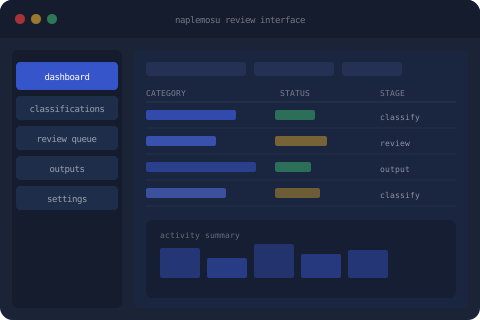
The review interface presents classified information in a panel layout. The left column provides category navigation; the main area displays individual records with their classification details; a summary panel on the right shows the aggregated state of the current category. Users can expand any record to examine its attributes in full. The interface applies consistent formatting regardless of the information type, so the presentation remains predictable across different sessions and categories.
Review Queue and Status Tracking
Items entering the system are placed in a review queue ordered by category and arrival time. Each item carries a status indicator that reflects its current position in the classification and review workflow. Status changes are logged and visible to the user at the item level. The queue does not apply priority weighting beyond the standard ordering rules; each item receives the same process regardless of its category or origin.
Enquiry and Access Channel
The enquiry channel allows users to direct formal questions to the Naplemosu support team. Submissions are categorised by request type and routed to the appropriate team member. The channel is not an automated response system; each submission is read and assessed individually. Users are not guaranteed a specific response time, and access requests submitted through this channel are considered but not automatically approved.
How to Engage with the Review Environment
Accessing the Naplemosu review environment follows a defined workflow. The steps below describe how the process is intended to operate, from initial enquiry to working within the interface.
-
1
Review the Available Platform Information
Before submitting an enquiry, review the System Overview and this Tools & Features page. Understanding what the platform does and does not provide helps ensure that any subsequent enquiry is relevant and specific.
-
2
Submit an Enquiry via the Contact Form
Use the Submit Enquiry page to send a formal request to the support team. Select the appropriate request type and describe your enquiry clearly. The form routes submissions to the team by category.
-
3
Receive a Response from the Support Team
The team reviews each submission and responds via the email address provided. Responses aim to address the stated enquiry directly. Clarification may be requested where additional context would help the team prepare a more accurate reply.
-
4
Access the Review Interface Following Confirmation
If access to the review environment is confirmed, users will receive guidance on how to proceed. Access is subject to review and is not guaranteed solely by submission of an enquiry. The team will communicate the outcome of each access request directly.
Have Questions About a Specific Capability?
If this overview does not address a specific question about the Naplemosu toolkit, the support team is available to respond. Use the enquiry form to describe what you need to know.